Friday, December 9, 2011

HDR procedural starfield Pt4

I think I've settled on a format for my stars; it's somewhat unconventional, but much lighter than float4 (128bits). It's a YRGB hybrid thing (56bits).

After reading up on YUV (or YCrCb) a little bit more, I realized that in order to use it properly all components need to be the same bit depth (ideally), and you need all three components to do the conversion properly. Meaning Y, U and V. So making Y a float and UV unsigned chars would save me a bunch of memory during star generation, but then creates a huge headache for colourization.

So by making them all floats I'm not saving much, and by making them uchars, I'm losing my HDR. And because I'm NOT too worried about obscene optimizations I figure there wasn't much in terms of savings between 2 uchars, and 3 uchars. Thus I settled on keeping my stars HDR using a float, and keeping my colours RGB using uchars.

Once I'm ready to write to file then I can do all the fancy conversions :)

Tuesday, December 6, 2011

HDR procedural starfield Pt3

I've been thinking about how I'm generating my stars, and for some reason when I decided float4 was the way to go, I've stuck with it during my rewrite of the app. However, when I think about it the only reason I did so was because of colour variation, and SSE... and the fact that it fits nicely into D3DFMT_A32B32G32R32F.

Float4 being:

__declspec(align(16)) struct float4
{
float r;
float g;
float b;
float a;
};

But the more I think about it all I really need is a float and some 8 bit colours. It would save on memory and as it is I'm not using SSE for anything other than turning a float into a float4 to plug back into the master star map. Like so:

//-----------------------------------------
//Use SSE to do some conversion into float4
//-----------------------------------------
float4 f4Res = {0,0,0,0};
__m128 result = _mm_set1_ps(starLum);
_asm
{
movaps xmm0, result
movaps f4Res, xmm0
}
*_star = f4Res;

I may end up doing a bit more reworking and start using a single float for brightness, then keeping track of colour variance with UV, essentially making everything YUV in the back end. By the time I'm ready to render to texture convert it to a 128bit RGBA DDS.

It's worth a try to speed things up a bit, and save memory. After all, working with six 128bit 1024x1024 (or larger) arrays can be slow.

Tuesday, November 15, 2011

HDR procedural starfield Pt2

Just a quick update about the lack of updates: I'm rewriting the star field generator to be more modular and OOP friendly. But the premise and functionality will be the same or better :)

Hang tight! I'll have something to post soon enough! ^_^

-M

Saturday, October 22, 2011

HDR procedural starfield Pt1

Firs there were star fields. Then there were procedural star fields. And now, I present to you a HDR procedural star fields! "Murr?"

Nothing too fancy, but in the day and age of modern HDR rendering and graphics, why shouldn't we have fancy star fields for space and nighttime levels? Think about how neat it would be when you have an environment where you're standing in an area with a lot of light polution, you only really see the brightest stars in the sky. Then, once you're in the clear and your eyes adjust how many more stars you see. Maybe even through night vision.

Recently I've started playing through Kotor 2 for the first time (after many years or owning the game), and one thing I saw in the early spacewalk scene was just how uniform and regular all the stars appeared. This in itself is somewhat jarring since even if you were in the centre of the galaxy, you would never get a star pattern quite like this. What a great place to use this kind of process I thought!

The method of generating these stars is pretty simple, really.
  1. We assume that the viewers perspective is more or less aligned to the galactic plane.
  2. There are stars above and below the viewer, but the majority exist along the "horizon"
  3. Some stars are brighter than others.
  4. Most stars are actually very dim.
What we end up with is a uniform distribution of dim / medium dim stars everywhere, and then progressively brighter stars near the galactic plane. It's definitely a starting point! Once I find the source code I wrote (and should have backed up onto a NON-portable medium (DOH!!!!)) I'll post freshly generated examples :D

On the technical side, I use doubles and floats to calculate everything, and then render the results to a 128bit, 6K x 8K DDS file. I could go more, but since I was using a 32-bit compiler I think I was running out of memory allocation O_o

I chose to do 32bit RGBA and sample real world (real space?) star data to get a more realistic distribution of star colours (temps) and luminosities. And while I COULD just as easily do a single 32bit gray scale channel, I think RGBA is much more fun ;)

From then on it's possible to tune and add general brightness variations in Photoshop (as long as it doesn't crash trying to open the 130MB+ DDS files), and add things such as nebulae, dark dust, etc.

About the biggest limitation of this custom build starfield generator is my own programming ability and lack of necessary math skills to be able to create this star field in a more useful longitude-latitude orientation. Or even a cross style cubemap where stars respect boundaries. It's something I intend to learn because it will greatly increase the fidelity of the starfield once it is transformed into those types of maps.

More on that in part 2!

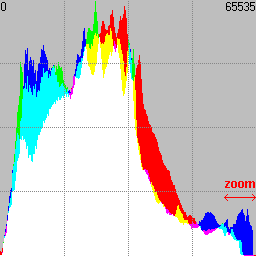
Linear histogram

This is something that I came up with (I think) for my own entertainment, but I think it might have uses elsewhere as well, somehow.


We all know traditional histograms:
Well, what would something like this look like when applied to video, and rendered over a linear timeline? Basically, look at the histogram from the top and make it a thin 1pixel by 256pixel strip. Go to frame two, do the same thing, and so on, and so on. The results can actually be very interesting!

This is the first 1024 frames of an Unreal speedrun. You can clearly see where the action is, where the player gets hurt, etc.

I'm not sure if this is something that actually HAS a name or not, but I call it a linear histogram. As for any practical application, well, I just find it interesting to look at, especially for highly saturated videos like of speedruns of FPS games. Real world videos aren't nearly as interesting looking, but then again I'm not approaching this from any practical application angle :) but others might.

As for the program I used to render these, it's a c++ application which uses OpenCV 2.3 to video videos. Then it's a simple matter of counting pixel intensities each frame, performing square root and normalization on each channel, and then writing the results to file.

The source code isn't anything too special, it gets the job done, and I'm sure someone who is a lot more technically proficient can make things run a lot more smoothly. I'll post it once my server IP updates again (If you do intend to run it, make sure you have OpenCV 2.3 installed and setup!)

That's all for now!

Reintroduction

So it's been a while since I've posted anything, but a lot has changed since then! First off I've wrapped up my work at Next Level Games and started a new adventure at EA canada as a full fledged technical artist, woot!

I've had a few projects on the go as well, just personal things that I find interesting and give me a chance to learn more technical skills. I'll post about them in successive posts since this is just to get thing rolling.

One of the reasons that has prompted me to get back into blogs is Extra Credits. Really, if you're into games (Or want to know more about the passion / problems in the industry) watch extra credits!! It's brilliant! I know I've heard of them when I was watching the escapist, but I haven't actually watched a single episode up until a few days ago, and I was like "My mind is blown!"

So yeah, with the intro out of the way, it's time to get into some more details as to what I've been up to outside of my family activities :)

Thursday, March 17, 2011

Sampling data over a sine wave

Now here is something people may find useful, an equation for sampling a number distributed over a sine wave. It took me a couple of days to come up with this, but it seems to hold up.

SUM_point = SUM_total * sin(((180 / points_total) * point_sample) * (4*atan(1)/180)) / (points_total / 1.5708)

Basically I've found that if you add up the values of n points on a half circle, the sum is about 0.6365 times less than the number of points. Or points_total is 1.5708 times greater than their sum. Eg, 180 samples = 114.589. 720 samples = 458.265. 684000 samples = 435448. Divide any of these sampled by the sum and you get about 1.5708

And by going through this equation, you can add all SUM_point, and it will be about SUM_total. And by "about" I mean within a few hundredths depending on your precision with 1.5708. With 10 million sample points, Visual Studio gives me 1.5707963705064640.

So now you may be wondering what use this is? Well, say you want to find out how much the sun is irradiating a patch of ground at any given point throughout the day. And the only thing you have is the total energy irradiated. Well, over an ideal 12 hour period, from 6am (0 degrees) to 6pm (180 degrees), you can use this equation to calculate how much irradiation was received every hour. Or, every minute (12 hours * 60 minutes (720 sample points)), or even every second (12h * 60m * 60s (43200 sample points)... theoretically :) Because the sun isn't just shining on the patch of ground at a constant angle, it moves and gets stronger then weaker.

This may have limited uses, but if you're wanting to model the real world with some degree of accuracy, it's useful.

Sunday, March 13, 2011

XNA 4.0

I've finally taken the time to install XNA 4.0 and will be working on a new game idea. It will also give me a change to get the technical mind a workout as well. As a technical artist I find it important for me to keep both my technical and creative sides active to maximize my potential and keep me from getting bored. Woot :)

Tuesday, January 25, 2011

Animation randomizer

With the recent work I'm been doing I've realized that doing canned animations of falling rocks can be a bit tricky. With the great utilities like the Phys-X simulator for max it is possible to make great simulation animations, but unless you make a pachinko machine setup, everything will tend to fall at the same rate, and straight down. While this in itself may not be too bad, the fact that it's all so uniform isn't too desirable.

While it is possible to grab each piece of geo and shift it's keys back and forth suggests to me that there should be a script driven randomizer for such a task :)

Select your animated object, define a + / - range, and click a button. Shouldn't be too difficult to write!